



ODOO'S FUNCTION
In Odoo, there is no native function to merge multiple draft invoices into a single, consolidated invoice. This can require businesses to send numerous separate invoices to the same customer, even if they are for the same project or delivery, which can be inefficient and confusing.
CLUEDOO'S FUNCTION
Cluedoo enhances invoicing flexibility by introducing:
1️⃣ The ability to select multiple draft invoices for the same partner and merge them into one consolidated invoice.
2️⃣ A streamlined way to issue a single invoice for a delivery that includes items from multiple sales orders.
This allows users to significantly reduce the number of invoices they send, simplifying the billing process and helping to comply with specific customer or contractual agreements.
1. Select a few draft invoices with the same partner and then click Actions → Merge Invoices. | 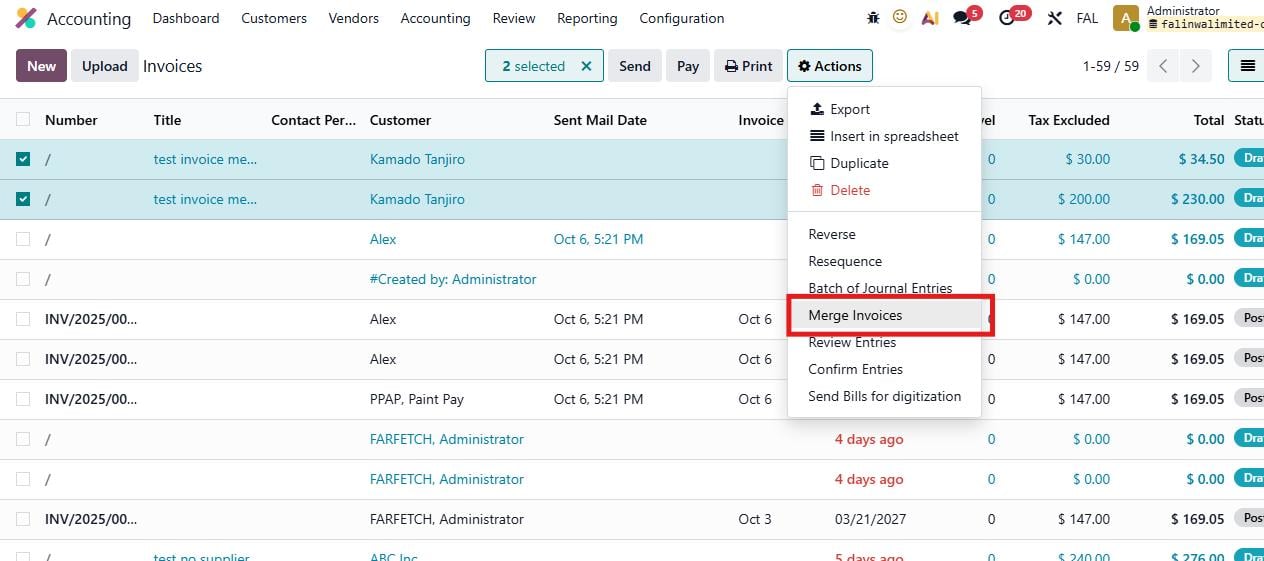 |
2. After clicking on Merge Invoices, the pop-up wizard that allows you to apply an action to the selected invoices will appear. You have three action choices:
|  |
3. After choosing, click on Merge. The result depends on the Invoice Action you choose. (This example is the result of Cancel Invoices) |  |