



ODOO'S FUNCTIONS
In Odoo, the standard functionality does not allow users to set a computation using Python code within Bills of Materials (BoM). The system does not provide a built-in way to dynamically calculate component quantities based on product attributes or production orders. Users must manually define the quantity of components required, which can be inefficient and error-prone, especially for complex manufacturing processes. Additionally, the "To Consume" column in Manufacturing Orders (MO) does not automatically reflect computed values based on custom logic.
CLUEDOO'S FUNCTIONS
Cluedoo enhances Odoo by introducing Python-based computation for Bills of Materials:
- Python Code for BoM Computation: Users can define dynamic calculations using Python code to determine component quantities.
- Automatic Component Quantity Calculation: The system automatically calculates the required quantity of components based on the volume of the finished product and the quantity to produce.
- Real-time Update in Manufacturing Orders: When creating an MO, the computed values are displayed in the "To Consume" column, ensuring accuracy and efficiency.
1. On BoM, we can set a computation using python code. For example:
This means: Volume on product template/finished product + 10 + quantity to produce We will set the volume of the product (Plastic Laminate): 10
The result will be: 10 + 10 + 1= 21
-> The result will be: (10 + 10 + 2) x 2 = 24 |   |
Note: in v18, volume is calculated by length, width and height if module fal_product_size_details is installed. If not, we can use Volume field as ODS. |  |
2. When we create a manufacturing order, select the finished product (Plastic Laminate). The "To Consume" column will show the computation of the Python code. |  |
HOW TO USE THIS MODULE
1
On BoM, we can set a computation using python code. For example:
If you set the volume of product: result = mo_id.product_tmpl_id.volume+10+mo_id.product_qty
If you set the volume of component:
result = product_template.volume+10+mo_id.product_qty
This means:
Volume on product template/finished product + 10 + quantity to produce
We will set the volume of the product (Plastic Laminate): 10
Quantity to produce on MO: 1
The result will be:
10 + 10 + 1= 21
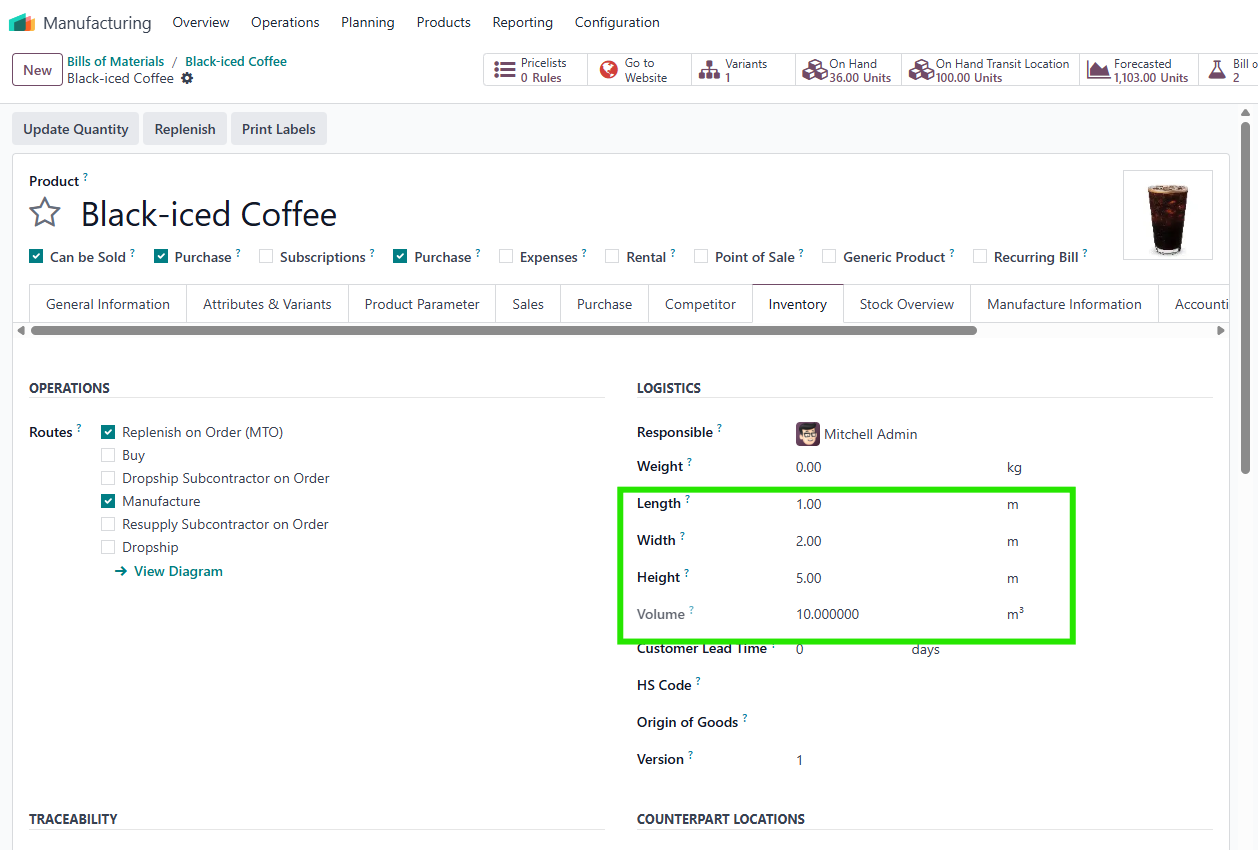
Note: in v18, volume is caculated due to these fields
2
When we create a manufacturing order, select the finished product (Plastic Laminate). The "To Consume" column will show the computation of the Python code.