

STORY BEHIND THE FEATURES
ODOO BEHAVIOR
By default, Odoo’s Repairs module allows users to create and manage Repair Orders (ROs) with invoicing capabilities, but it does not support down payments directly on ROs.
CLUEDOO BEHAVIOR
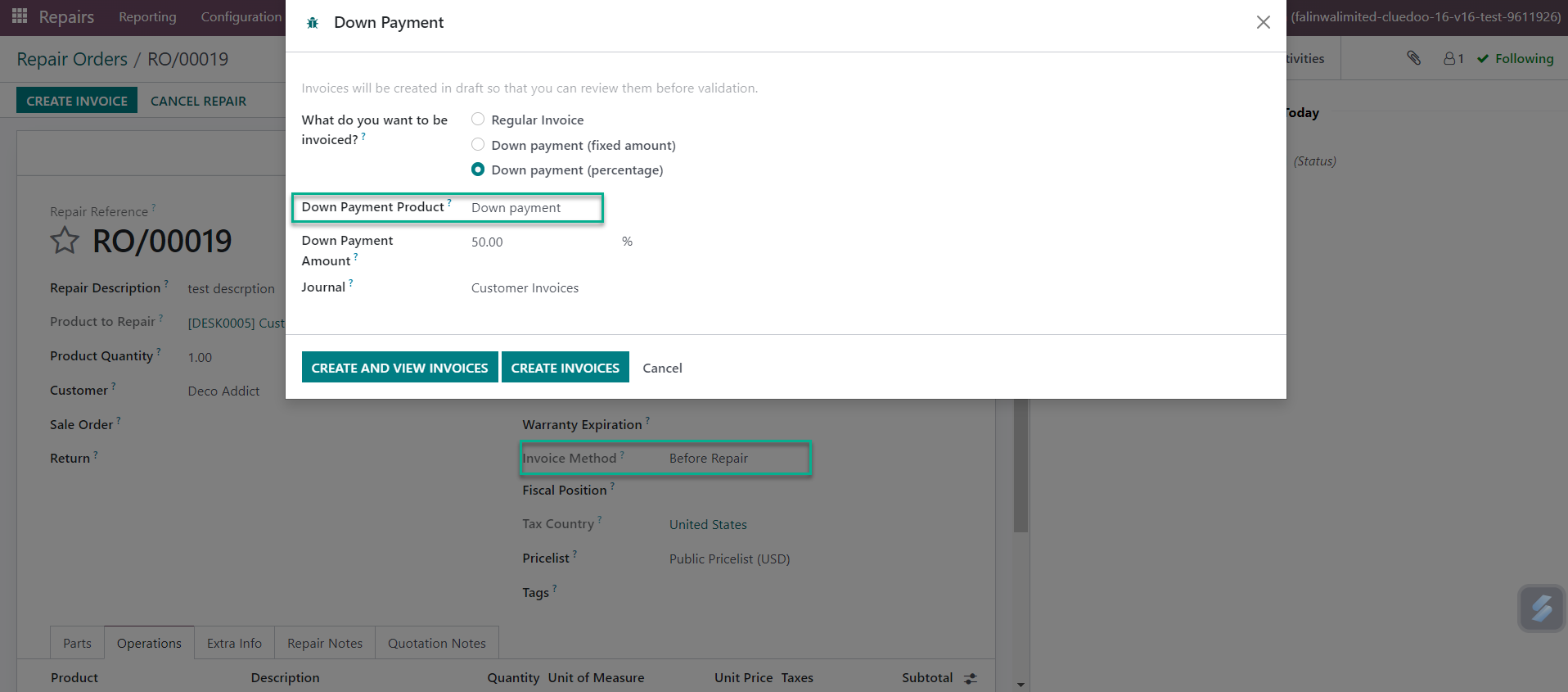
This modle enables the creation of down payments on Repair Orders by adding a Down Payment option in the invoicing process, supporting both Fixed Amount and Percentage methods. Besides, it also automatically cancels draft down payment invoices when the associated Repair Order is canceled, ensuring consistency and reducing manual cleanup.
HOW TO USE THIS MODULE ?
1. Create down payment
On Repair Order:
- Choose Invoice Method
- Confirm Repair Order
- Click create invoice button > Down payment (2 options: fixed amount or percentage)
- Choose Down payment product
- Specify donwn payment amount
- Click Create and view invoices
2. Cancel
When cancel Repair Order, draft Down payment invoices will get cancelled too.