



ODOO'S FUNCTION
Odoo provides a useful way to communicate from within Odoo and keep track of all communication. However, when we receive an email from Odoo, Odoo does not display all recipient email addresses when sending messages to followers, making it difficult to see who received the communication.
CLUEDOO'S FUNCTION
CLuedoo clarifies the situation by allowing you to see all follower email addresses in CC so that improves communication and reduces the risk of accidental emails.
1. When we send a message within Odoo messaging, it will give the information of the recipient in the e-mail. Note: Set the outgoing mail server. | 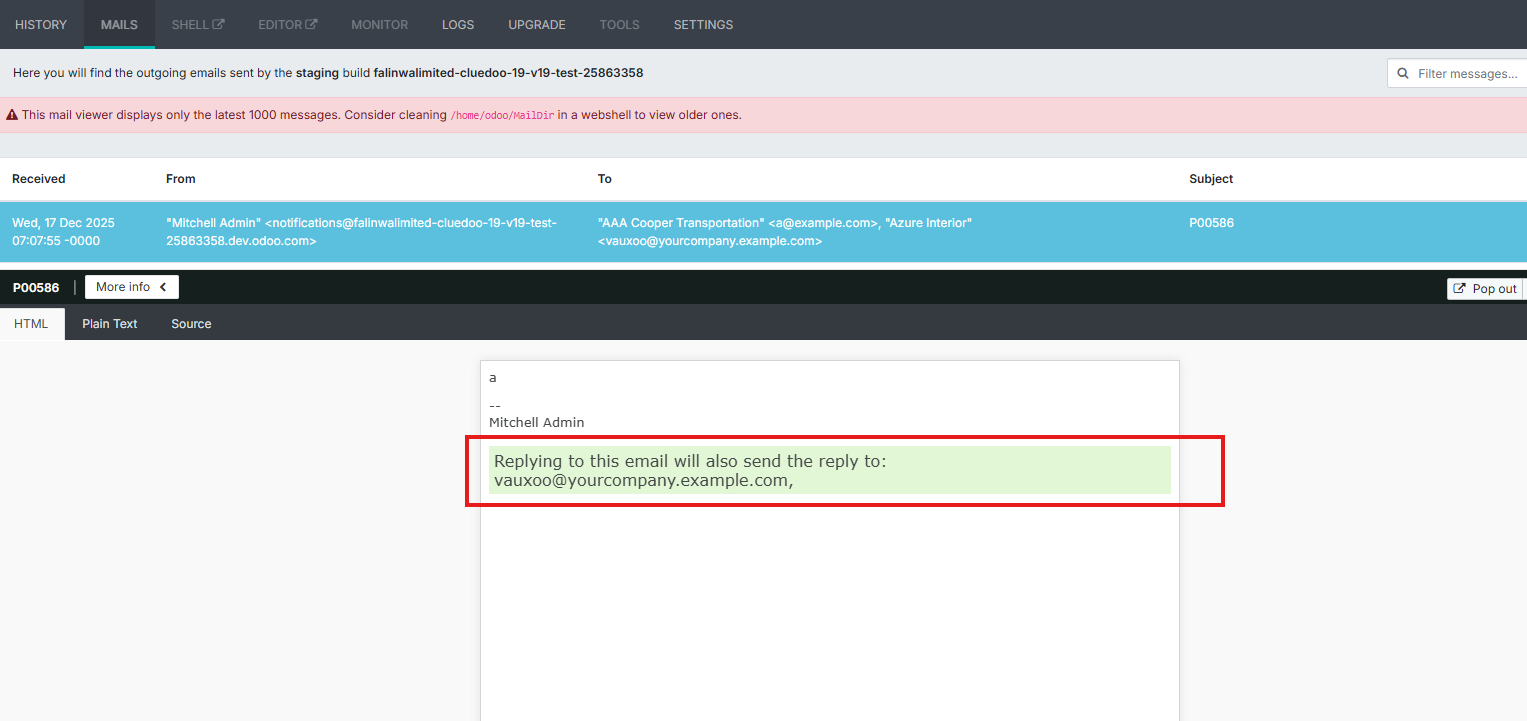 |
STORY BEHIND THE FEATURES
ODOO'S FUNCTIONS
Odoo provides a useful way to communicate from within Odoo and keep track of all communication. However, when we receive an email from Odoo, Odoo does not display all recipient email addresses when sending messages to followers, making it difficult to see who received the communication.
CLUEDOO BEHAVIOUR
Cluedoo clarifies the situation byallowing you to see all follower email addresses in CC.
MODULE +
Improves communication and reduces the risk of accidental emails.
CLUEDOO RECOMMENDATION
Install in 100% of your database.
OUR FEATURES AS SOLUTIONS
Gives all Recipient Information on Emails
HOW TO USE THIS MODULE
1
When we send a message within Odoo messaging, it will give the information of the recipient in the e-mail.
Note: Set the outgoing mail server.

