



ODOO'S FUNCTION
Odoo manages pricelists but does not support the concept of a target price or the resulting price gap.
CLUEDOO'S FUNCTION
CLuedoo introduces the concept of a target price on purchase order lines, giving purchasers a clear pricing framework while offering greater responsibility and flexibility than a traditional pricelist. Purchasers can choose suppliers and negotiate prices more freely while still aligning with the defined target price.
1. Go to Settings > Users & Companies > Users > Choose a user and check Manage Purchase Target Price
|  |
2. Create a Purchase Order Target Unit Price Your target unit price for the product Target Subtotal Target Unit Price * Quantity Total Mark-up = Total Gross Margin Gross Margin = Target Unit Price - Unit Price Mark Up (%)
Avg Mark-up % Average % of Mark Up | 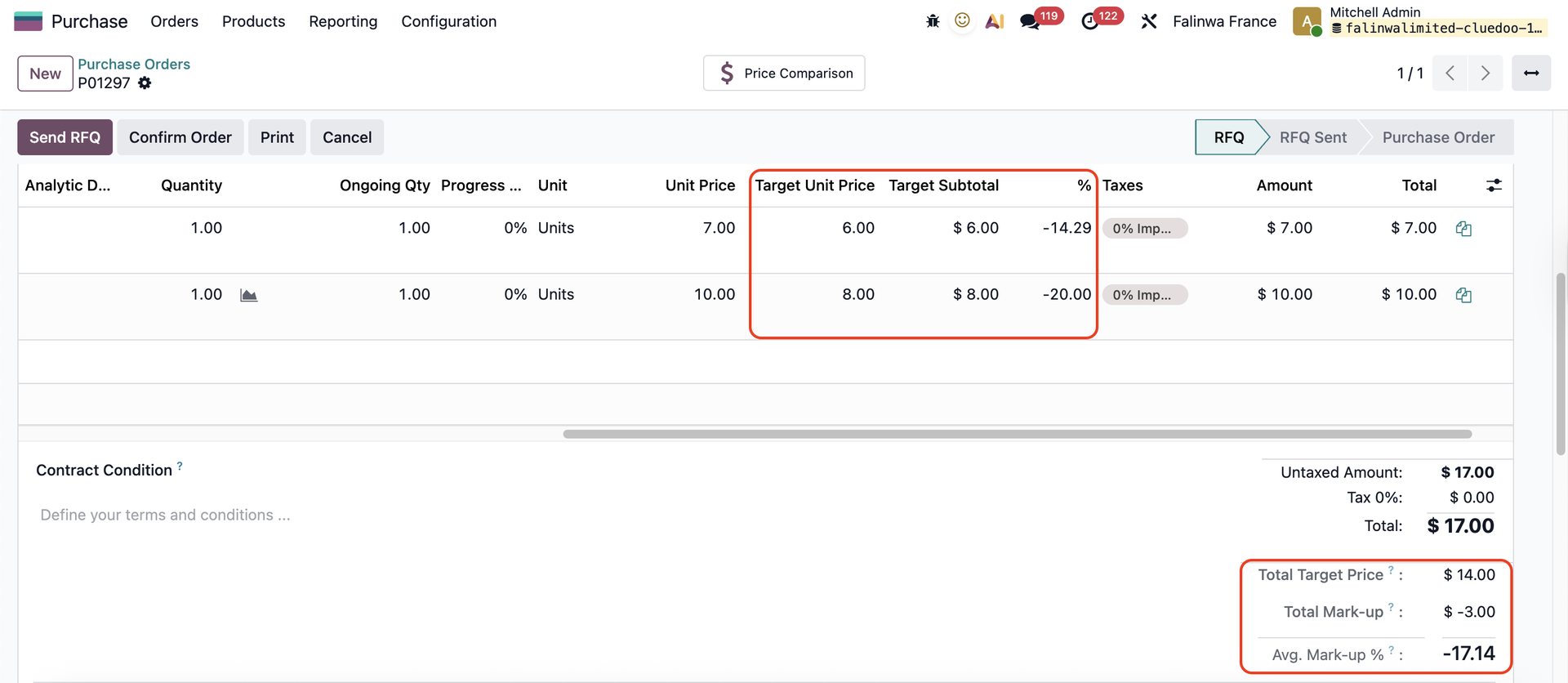 |