



ODOO'S FUNCTION
In Odoo’s tablet view for Manufacturing Orders, quality checks can be performed, but it does not display the Quality Check Number or Quality Point Title, making it harder for operators to identify what is being checked.
CLUEDOO'S FUNCTION
Cluedoo improves the tablet view by displaying both the Quality Check Number and Quality Point Title during quality checks. This enhancement:
1️⃣ Provides better clarity for shop floor users.
2️⃣ Reduces errors by clearly showing what each check refers to.
It ensures a more user-friendly and informative quality control process.
1. Quality > Control Point > Set up control point with the product we want to have the quality check (product, operation, work order operation and control per) Note: You have to assign Work Order operation and Operations | 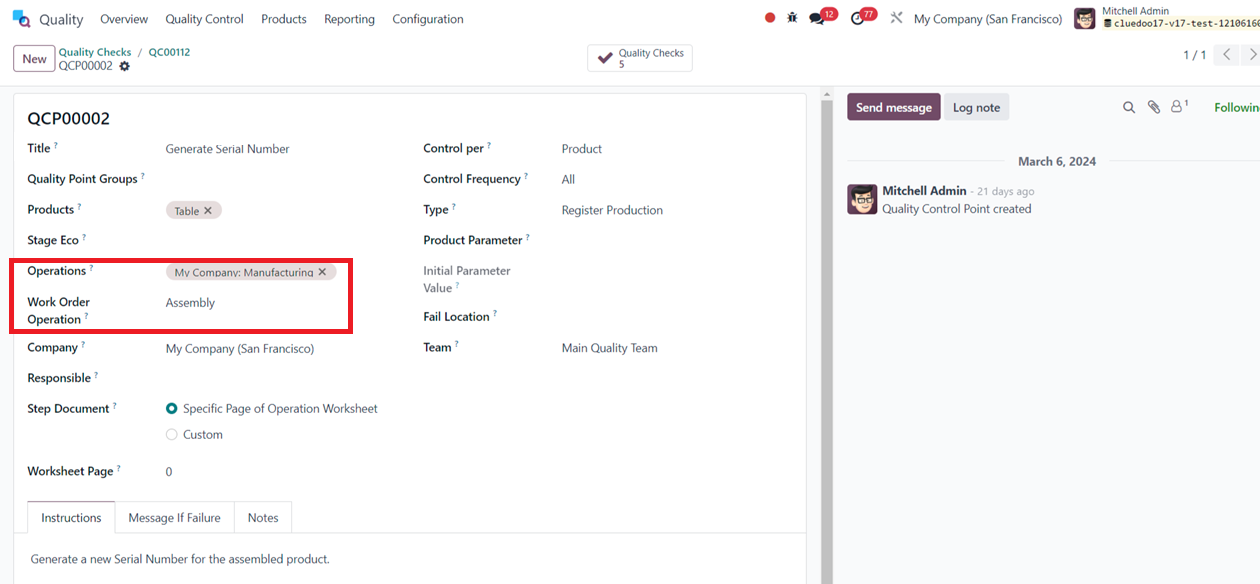 |
2. Create a Manufacturing Order with BoM with work order. |  |
3. In Work order, click the Open Shop Floor |  |
4. In Shop Floor, we can see the quality check name and quality point title. |   |